- Rust 99.8%
- Shell 0.2%
| Filename | Latest commit message | Latest commit date |
|---|---|---|
 phil
fb70ad687c
phil
fb70ad687c
The laptop builds terminaldrome from a pinned commit of this fork in ~/nixos-config, so a new version only reaches it once rev and hash are updated there. Co-Authored-By: Claude Opus 5.5 <noreply@anthropic.com> |
||
| docs | ||
| src | ||
| .gitignore | ||
| AGENTS.md | ||
| build.sh | ||
| Cargo.lock | ||
| Cargo.toml | ||
| CHANGELOG.md | ||
| LICENSE | ||
| README.md | ||
| STRUKTUR.txt | ||
| terminaldrome_0.9.5.png | ||

TerminalDrome
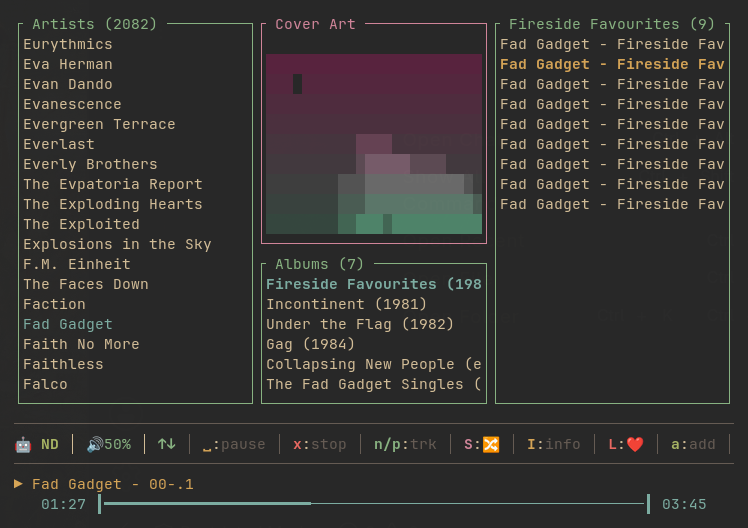
A terminal-based music client for Navidrome (and other Subsonic-compatible servers) and Bandcamp, written in Rust.
    _______                  _             _
   |__   __|                (_)           | |
      | | ___ _ __ _ __ ___  _ _ __   __ _| |
      | |/ _ \ '__| '_ ` _ \| | '_ \ / _` | |
      | |  __/ |  | | | | | | | | | | (_| | |
    __|_|\___|_|  |_| |_| |_|_|_| |_|\__,_|_|
   |  __ \  w. Bandcamp, Playlists & Lyrics
   | |  | |_ __ ___  _ __ ___   ___
   | |  | | '__/ _ \| '_ ` _ \ / _ \
   | |__| | | | (_) | | | | | |  __/
   |_____/|_|  \___/|_| |_| |_|\___|

by Jan Montag
About this fork
This is a fork of thafaker/terminaldrome by Jan Montag, based on its version 0.9.7. Everything else in this README applies to both; this section lists what the fork does differently.
Added
- Sonos output —
Shift+Ochooses where the music plays: on this computer through mpv, or in any Sonos room or group. A song that is playing carries on in the new room at the same position. The speaker streams straight from the Subsonic server; TerminalDrome fills its queue (with title, artist and cover for the Sonos app) and follows its position, so the progress bar, scrobbling, lyrics and the jukebox keep working. Hi-res FLAC and other files Sonos cannot play are transcoded to MP3 on the way. Configured through an optional[sonos]section, see Sonos. - Real cover art — covers are drawn as the actual image, in colour, through
Sixel, Kitty or iTerm2 graphics, and as coloured half blocks in terminals
without a graphics protocol. The cover box grows with the panel width. The
original ASCII renderers remain available via
TERMINALDROME_COVER, see Cover art rendering. - Mouse support — click artists, albums and playlists to open them, double-click a song to play it, right-click to go back or close an overlay. The hints in the status bar are buttons, the progress bar seeks on click or drag, and a new volume slider sits next to it. The wheel scrolls lists and, over the bars, seeks or changes the volume. See Mouse.
Changed
- Browsing without playing — opening an album or playlist (
→,Enteror a click) only shows its tracks; music that is playing carries on.Enteror a double click on a track plays the list from there. In the original, opening an album started it at once and stopped whatever was playing. - Fuzzy filter —
/filters the list in focus as you type. See Filter. - Library search —
Shift+Fsearches artists, albums and songs of the whole library at once, fuzzy and as you type, on a local index instead of the server's title-only search. See Search. - Seeking and volume on the arrows —
Shift+←/Shift+→jump 10 seconds back or forward,Shift+↑/Shift+↓change the volume; the plain arrows keep navigating. The progress bar can be clicked or dragged as well. - Splash screen — can be switched off with
[ui] splash = false. - Quitting —
Ctrl+Cquits as well asShift+Q. Music on a Sonos speaker keeps playing after TerminalDrome is closed. - Song list — shows only the title and its length, flush right, instead of artist, album, length and title on every row.
- Scrolling — lists keep the selection in view by their real height on screen instead of a fixed 15 rows (5 for albums).
- Dependencies — ratatui 0.26 → 0.30, crossterm 0.27 → 0.29,
image 0.24 → 0.25, plus
ratatui-imageandunicode-width. - Version 0.10.0.
Fixed
- The right cover — playlists never showed a cover, because they looked it up by album name in an album list that playlist mode empties. Playlists, search results and the jukebox now show the artwork of the song playing.
- One request per cover — a cover was requested again on every redraw until the first request came back.
- Albums under songwriters — gonic (0.20 and later) lists an album under every artist credited on any of its tracks, composers and lyricists included, so the Ramones' Acid Eaters showed up under Bob Dylan. Only an album's own artists count now.
- Scrobbling a restarted song — starting a list again at the song that was already playing did not scrobble it a second time.
The full list is in CHANGELOG.md under 0.10.0.
Getting Started with TerminalDrome
I wrote a "Getting Started with TerminalDrome: A First-Time Users Guide" (Link) on how to configure TerminalDrome and how it works.
Features
New in 0.10.0
- 🖼️ Real cover art — the cover is shown as the actual image, in colour, through Sixel, Kitty or iTerm2 graphics, with coloured half blocks where a terminal has none. The ASCII renderers remain available.
- 🎯 The right cover — playlists, search results and the jukebox show the artwork of the song that is playing; playlists never had a cover before.
- 🔈 Sonos —
Shift+Osends the music to any Sonos room and back, continuing the current song where it was. - 🖱️ Mouse support — click panes, artists, albums, playlists and songs, the hints in the status bar, and drag the progress bar and the new volume slider. See Mouse.
- 🧹 A tidier song list — only the title and its length, flush right.
New in 0.9.7
- 🎤 Lyrics that follow the song — press
Shift+Yand the line being sung is marked, the lines already past are dimmed, and the view scrolls to keep up on its own. Read the words along with the music instead of hunting for them. - 📝 Lyrics that admit when they have no timings — a track whose lyrics
arrive without timestamps says
ohne Zeitangabenin the title bar. They are shown exactly as before, but a still page was otherwise indistinguishable from a feature that is not working. - 📜 LRC parsing —
[mm:ss.xx]and[mm:ss:xx], several timestamps on one line, unsorted lines, and section markers such as[Chorus]. - 🔀 A source switch is a round trip — each of Navidrome and Bandcamp keeps the view it was left in, so going to the other server and back returns to the same artist, album or playlist at the same place in its list.
Two changes behind the first one are worth knowing about if you maintain a
server: the timings live in structuredLyrics, which reaches clients through
getLyricsBySongId, not in the plain getLyrics response. TerminalDrome asks
for that endpoint first and falls back to getLyrics for servers without the
OpenSubsonic extension, so nothing is required of you and no track loses lyrics
it could be shown before.
New in 0.9.6
- 🔊 The visualizer stops lying — without
cavathe bars were a canned demo animation, and nothing on screen said so, so it looked exactly like a visualiser reacting to the music. It now labels the bars while they are a demo and names the program that is missing. The label disappears as soon as real levels arrive, so a working setup shows nothing extra. - 🌍 Install commands that match your system — the setup wizard and these
instructions resolve the package manager from
/etc/os-releaseinstead of assuming Arch.
New in 0.9.5
-
🖼️ Cover art you can recognise — the character ramp was not monotonic: ink rose to
@and then fell off again, which rendered near-white artwork almost blank and made ordinary covers look noisy. Both ramps now run monotonically from empty to solid, so brighter pixels always carry more ink. The renderer is also selectable now:blocks— five tonal steps, keeps the gradation (default)ascii— ten tonal steps, pure ASCIIhalfblock— two pixels per cell, sharper edges, but binary per sub-pixel
All three modes occupy the same grid, so switching never moves the layout. Set
asciiif your terminal font has no block glyphs:TERMINALDROME_COVER=ascii terminaldrome -
ℹ️
terminaldrome --about— a longer description of the project, what it is aimed at, who wrote it and under which license it is released. It works before anything is configured, so it will not start the setup wizard. -
⏸️ Pause / resume with
Space—Spacenow pauses and resumes, the same binding mpv itself uses, instead of stopping playback outright. Playback continues from the exact position and the track does not change. Stopping for good moved tox. A⏸ pausedindicator shows in the status bar. -
🐛
Spaceno longer throws you out of the playlist — it used to force the view back to Artists, so pausing in a playlist and pressingEnterdropped you out of the list entirely. Stopping the playback kept your place too; only leaving Jukebox mode still returns to Artists. -
🎵 Correct track titles in mpv again — Bandcamp streams ship without ID3 tags, so mpv had nothing to display and fell back to the raw stream URL (
https://bandcamp.com/api/subsonic/stream?id=…) in the window title. Every track is now handed to mpv with an explicitArtist - Title, so the window title and any OSC/media display show the song again. Tracks whose server metadata has no title keep mpv's own fallback. -
🩺 Bandcamp failures are no longer silent — Bandcamp's Subsonic implementation is an open beta and answers endpoints it does not support with HTTP 200 and an empty body. That used to be indistinguishable from "this account has no albums". TerminalDrome now validates the HTTP status and the Subsonic response envelope on every call, so a rejected request is reported as an error instead of an empty list. A failure now always tells you whether the server refused the call or genuinely returned nothing.
-
🩺 Bandcamp connection check at startup — if the Bandcamp credentials are rejected, you get a warning right after the splash screen instead of wondering why the library is empty.
-
🔌 Hardened source switching — a
[bandcamp]block that is not actually configured is no longer offered as a source, and a saved-but-broken Bandcamp block falls back to Navidrome at startup instead of dropping you into an empty view. The footer hint only advertises sources that work. -
🔑 Optional
passwordinconfig.toml— instead of a fixedtoken/saltpair you can store the password and let TerminalDrome mint a freshly salted token per request. That is the better option, because a stored token never rotates. -
📣 Failed actions are visible — playlist edits, likes and scrobbles report failures in the status bar and log instead of failing silently.
-
🧹 Cleanups — removed a dead
credentialsmodule and a stalemain.rs.bak; the version in the splash screen and inbuild.shis now read fromCargo.tomland can no longer go stale.
New in 0.9.0
- 📋 Playlist management — TerminalDrome is no longer read-only. You can now create playlists, add songs to them, and remove individual tracks.
- Press
awhile any song is playing to open the playlist picker. - Press
Shift+Ninside the picker to create a new playlist on the fly — the current song is added automatically. - Press
din the playlist view to remove the selected song from the playlist. - Works with both Navidrome and Bandcamp backends.
- Press
- 🖥 Fullscreen help — the help screen (
Shift+H) now uses the entire terminal and splits into two columns, so every shortcut fits comfortably even on an 80×24 terminal. - 📏 Context-sensitive status bar — the bottom line shows only the keys that apply to the current view. Universal keys (
H,Q) stay right-aligned at all times.
New in 0.8.6
- 🎼 Song info overlay — press
Shift+Ito see bitrate, format, file size, path, server play count, and a local play counter that TerminalDrome maintains itself across sessions. Works for both Navidrome and Bandcamp. - 📊 Local play counter — TerminalDrome now tracks how often you've played
each song in its own state file, independent of the server. Useful when the
backend (e.g. Bandcamp) doesn't provide a
playCountfield. - 📏 Compact status bar — the bottom bar is now context-sensitive: it only shows the keys that actually do something in the current view, so the whole TUI stays usable on an 80×25 terminal.
New in 0.8.5
- 🎸 Bandcamp support — switch between Navidrome/Subsonic and a Bandcamp-compatible server with
Shift+B. - 🔐 Secure first-time setup — if credentials are missing or still placeholders, TerminalDrome asks for them interactively at startup.
- 🧾 CLI arguments —
--config <FILE>,--server <URL>,--user <USERNAME>(plus the usual--helpand--version). - 🔑 Local token derivation — your password is hashed together with a random salt and stored only as
token+salt. The plaintext never touches the disk. - ⚙️ Optional Bandcamp config — can be enabled via
[bandcamp]inconfig.toml.
All Features
- 📋 Playlist editing — create playlists, add and remove tracks from inside the TUI
- 🎤 Synced lyrics (
Shift+Y) with the current line highlighted and auto-scrolling; LRC timestamps supported, untimed lyrics labelled - 🎼 Song info overlay (
Shift+I) with bitrate, format, file size, and play counts - 📊 Local play counter — tracks your plays across sessions, per source
- 🎵 Browse artists, albums, and songs from your Navidrome server
- 🎸 Optional Bandcamp source (Subsonic-compatible endpoint)
- 🔀 Shuffle any album or playlist with
Shift+S(Fisher-Yates shuffle, restarts playback from the new order) - 🎉 Jukebox / Party Mode (
Shift+J) — infinite random playback of your full library, auto-refilling in the background - 🖼️ Real cover art in the terminal (Sixel / Kitty / iTerm2, half-block fallback)
- 🔈 Sonos output (
Shift+O) — play to any room or group - 🔍 Full-text search across your music library
- ⌨️ Keyboard-driven navigation with quick A–Z jump
- 🔊 Volume control (
+/-) and mute toggle (m) - ⏸️ Pause / resume (
Space) and stop (x) — pausing keeps your place in the playlist - ⏭️ Next / previous track (
n/p) - ❤️ Like songs (
Shift+L) - 📡 Scrobbling support — marks songs as played in Navidrome
- 🔒 Token-based auth (Subsonic API ≥ 1.13.0 — your password is never sent in plaintext)
- 💾 Persistent state — remembers your last position between sessions
- 🎛️ Source switching —
Shift+Btoggles between Navidrome and Bandcamp, each keeping its own place in the library
Security & Token Auth
TerminalDrome authenticates against the Subsonic API using the standard token scheme: token = md5(password + salt). When you enter your Navidrome password during first-time setup, TerminalDrome generates a random salt, computes the token locally, and stores only the resulting token + salt in config.toml. Your plain-text password is never written to disk.
Navidrome does not offer dedicated "App Tokens" that you generate in the web UI.
How it works
- On first start (or whenever credentials are missing / still contain placeholder values), TerminalDrome prompts for:
- Server URL
- Username
- Password
- The entered secret is combined with a freshly generated random salt and hashed with MD5:
token = MD5(password + salt) - Only
tokenandsaltare written toconfig.toml. The plaintext password is discarded and never stored. - On Unix systems the config file is saved with
600permissions.
You do not need to visit any website to generate a token. The derivation happens entirely on your machine. All you have to do is enter your normal Navidrome password when prompted.
Optional: Navidrome App Tokens
If you'd rather not type your account password into a terminal at all, you can create a Navidrome App Token and enter that as the "password" when TerminalDrome asks for it. TerminalDrome will then hash the App Token the same way (MD5 + salt) and use the result as the Subsonic token.
To create one:
- Log into your Navidrome web interface.
- Go to Personal Settings → Personal Access Tokens.
- Create a new token for
TerminalDrome. - When TerminalDrome asks for your password, paste the App Token instead.
This is purely optional — a normal account password works just as well, and TerminalDrome never writes it to disk either way.
Requirements
- A running Navidrome instance (or any Subsonic-compatible server)
- Optional: Bandcamp supports Subsonic at https://bandcamp.com/api/subsonic. With credentials from your Bandcamp fan settings you can use Bandcamp as a second source in TerminalDrome (see Bandcamp support for its current limitations)
- mpv installed and available in your
$PATH - (Optional) cava for the audio visualizer backend
- Rust toolchain (for building from source)
Install mpv
macOS:
brew install mpv
Linux (Debian/Ubuntu):
sudo apt install mpv
Linux (Fedora):
sudo dnf install mpv
Linux (Arch):
sudo pacman -S mpv
NixOS:
nix profile install nixpkgs#mpv
(Optional) Install cava (Visualizer backend)
If you want the visualizer to react to real audio, install cava. Without it
the visualizer still runs, but shows a clearly labelled demo animation instead
of reacting to the music.
macOS:
brew install cava
Linux (Debian/Ubuntu):
sudo apt install cava
Linux (Fedora):
sudo dnf install cava
Linux (Arch):
sudo pacman -S cava
NixOS:
nix profile install nixpkgs#cava
Package names vary between distributions and some do not package cava at
all. If yours does not, use your package manager's search, or build it from
source. TerminalDrome tells you what it
could not find when you open the visualizer.
Installation
From source
git clone https://git.syslinx.org/phil/terminaldrome
cd terminaldrome
cargo build --release
./target/release/terminaldrome
Install system-wide
cargo install --path .
After that, just run:
terminaldrome
From crates.io
This installs the original version, without the changes of this fork.
cargo install terminaldrome
Configuration
TerminalDrome looks for a config file in the following locations (in order):
./config.toml(current directory)- OS-specific config directory, e.g.:
- Linux:
~/.config/terminaldrome/config.toml - macOS:
~/Library/Application Support/terminaldrome/config.toml
- Linux:
You can also point TerminalDrome at a specific file with --config <FILE>.
A minimal config.toml looks like this:
[server]
url      = "https://your-navidrome-server.com"
username = "your-username"
# password = "your-password"   # optional; only needed if you want to skip the interactive prompt
# token    = "..."             # derived automatically from password/app token
# salt     = "..."             # derived automatically from password/app token
If the file is missing or credentials are still placeholders, TerminalDrome launches an interactive setup on the next start and writes the resulting token + salt back to disk.
To start without the two-second splash screen:
[ui]
splash = false
Bandcamp support
To use Bandcamp as a second source, add a [bandcamp] section:
[bandcamp]
enabled  = true
url      = "https://bandcamp.com/api/subsonic"
username = "your_username"
token    = "your_token"
salt     = "your_salt"
enabled defaults to true, so you can leave it out; set it to false to keep
credentials around while switching the source off. token + salt are what the
interactive setup writes. You can also supply password instead — TerminalDrome
then mints a correctly salted token per request, which is the better option
because a stored token never rotates.
To get started, go to Fan Settings, scroll down to Subsonic, and generate your credentials. You can then add Bandcamp as a Subsonic or OpenSubsonic server in your Subsonic client with the server URL https://bandcamp.com/api/subsonic.
TerminalDrome verifies the Bandcamp connection at startup and prints a warning if it fails, so a bad password shows up immediately rather than as a mysteriously empty collection.
Bandcamp support is partial. Bandcamp's Subsonic implementation is an open beta and does not cover the whole API —
search3andgetPlaylistare currently unreliable, and unsupported endpoints answer with HTTP 200 and a body that carries no data. Browsing by artist/album and streaming work; search and opening playlists may not. TerminalDrome reports these as explicit errors rather than silently showing an empty list, so a failure always tells you whether the server rejected the call or genuinely returned nothing.
Cover art rendering
Album art is shown as the actual image, in colour. At startup TerminalDrome asks the terminal which graphics protocol it speaks and uses the best one:
| Terminal | Protocol |
|---|---|
| kitty, Ghostty | Kitty graphics |
foot, WezTerm, xterm (-ti vt340), Konsole, Windows Terminal |
Sixel |
| iTerm2, WezTerm | iTerm2 inline images |
| anything else with true colour | coloured half blocks |
The cover box grows with the width of the panel so a square cover fills it. The cover shown is the selected album's while albums are being browsed, and the playing song's own artwork everywhere else — in playlists, search results and the jukebox too.
The older text renderers are still there, selected with the
TERMINALDROME_COVER environment variable:
| Value | Ramp | Notes |
|---|---|---|
image |
— | Default. Real image as described above |
blocks |
" ░▒▓█" |
Five tonal steps |
ascii |
" .:-=+*#%@" |
Pure ASCII, ten tonal steps |
halfblock |
" ▀▄█" |
Two pixels per cell, sharper edges, monochrome |
TERMINALDROME_COVER=ascii terminaldrome
Inside tmux, graphics only get through with set -g allow-passthrough on;
otherwise you get the half-block fallback.
Sonos
Press Shift+O to choose where the music comes out: this computer (mpv) or
any Sonos room. Grouped rooms appear as one entry, named after the rooms in
the group. Whatever is playing carries on in the new room at the same spot.
Rooms can be grouped right there: Space (or a click on the check box)
marks a room, and Enter with two or more marked joins them and plays on
the group. If the group playing now is among them, it leads and its music
spreads to the others; otherwise the room marked first leads and the song
moves over. u splits the group under the cursor into its rooms again; its
first room keeps playing.
The speaker fetches the stream from your server itself, so the server URL in
[server] has to be reachable from the speaker. TerminalDrome fills the
speaker's queue, including title, artist and cover for the Sonos app, and
reads the position back once a second, so the progress bar, scrobbling, the
jukebox and the lyrics view work as usual. Space, n/p, +/- and m
control the speaker, as do the volume slider and the mouse wheel over it;
volume and mute apply to the whole group. TerminalDrome reads them back once
a second, so a change made in the Sonos app or on the speaker shows up in
the slider too.
Speakers are found by an SSDP search. Many host firewalls drop the replies,
because they arrive as unsolicited unicast. In that case, or to skip the
search, name a speaker in config.toml — one is enough, it knows the rest:
[sonos]
hosts       = ["192.168.1.97"]  # optional, one or more speaker addresses
room        = "Kitchen"         # optional, play there from startup
format      = "mp3"             # optional, transcode everything for Sonos
max_bitrate = 320               # optional, with format
Quitting TerminalDrome leaves a Sonos speaker playing, as the Sonos app
does: the speaker streams from the server by itself. Songs still being sent
to its queue get a moment to arrive first. Played songs are only scrobbled
while TerminalDrome runs, and the jukebox stops topping up the queue. Press
x before quitting to stop the music.
Files a Sonos speaker cannot play are transcoded to MP3 320 automatically:
FLAC above 24 bit / 48 kHz (hi-res) and formats such as DSF, APE or WavPack.
A speaker gives no error for those, it just stays stopped at 0:00; should
that happen anyway, the status bar says so. Everything else is streamed
untouched. Set format only to transcode every song; the server has to
support transcoding (gonic and Navidrome do).
CLI Usage
terminaldrome --help
Available arguments:
| Argument | Description |
|---|---|
--config <FILE> |
Path to configuration file |
--server <URL> |
Subsonic server URL (overrides config) |
--user <USERNAME> |
Username (overrides config) |
--about |
Longer description of the project, the author and the license |
--help |
Show help |
--version |
Show version |
--about prints a short description of the project, what it is aimed at, who
wrote it and under which license it is released — and it works even before you
have configured anything.
Example:
terminaldrome --server https://music.example.com --user jan
Keyboard Shortcuts
Navigation
| Key | Action |
|---|---|
↑ / ↓ |
Move selection up / down |
← / → |
Switch between views (Artists → Albums → Songs) |
Enter |
Confirm selection / start playback |
Tab |
Toggle between Artists and Playlists view |
A–Z |
Quick jump to first entry starting with that letter |
Playback
| Key | Action |
|---|---|
Space |
Pause / resume (keeps your place in the list) |
x |
Stop playback |
n |
Next track |
p |
Previous track |
Shift+← / Shift+→ |
Seek back / forward 10 seconds |
Shift+↑ / Shift+↓ |
Volume up / down |
+ / = |
Volume up |
- |
Volume down |
m |
Toggle mute |
Shift+S |
Shuffle current album / playlist / Jukebox queue and restart |
Shift+L |
❤️ Like current song |
Lyrics
| Key | Action |
|---|---|
Shift+Y |
Show lyrics for the playing song |
↑ / ↓ |
Scroll by one line — this stops the view following the song |
PgUp / PgDn |
Scroll by a screenful |
Home / End |
Jump to the start or end, and resume following |
ESC |
Close the lyrics view |
Playlists
| Key | Action |
|---|---|
a |
Add currently playing song to a playlist |
Shift+N |
Create a new playlist (inside the picker) |
d |
Remove selected song from the open playlist |
Modes
| Key | Action |
|---|---|
Shift+B |
Toggle music source (Navidrome ↔ Bandcamp) |
Shift+J |
Start Jukebox / Party Mode (random playback of entire library) |
Shift+E |
Toggle fullscreen audio visualizer |
Shift+O |
Choose output: this computer or a Sonos room; Space marks rooms to group, u ungroups |
ESC |
Exit Jukebox Mode and return to Artists (also closes the Visualizer) |
Filter
/ filters the list you are in — artists, albums, playlists or songs — as
you type. Matching is fuzzy and ignores case and accents: /warren or
/zevon find Warren Zevon, /warren zev narrows it to him, /bjork finds
Björk, and /wzvn still finds Warren Zevon. The best match comes first and
is selected.
| Key | Action |
|---|---|
↑ / ↓, PgUp / PgDn, wheel |
Move between matches |
Enter, click |
Take the match and open it — an artist's albums, an album's tracks, or play a song |
Esc, Backspace on an empty filter |
Cancel |
If nothing in the list matches, Enter opens the library-wide
search with what you typed.
Search
Shift+F searches the whole library and shows artists, albums and songs in
three columns as you type. It is fuzzy like the filter and looks at title,
artist and album at once: zevon lists Warren Zevon, his albums and every
song of his, zevon lawyers narrows it to one song, and lawyrs still finds
"Lawyers, Guns and Money". The column with the best match is selected.
| Key | Action |
|---|---|
Tab / Shift+Tab, ← / → |
Switch column |
↑ / ↓, PgUp / PgDn, wheel |
Move within the column |
Enter |
Artist: show its albums · Album: show its tracks · Song: open its album and play from that song |
| Click / double-click | Open an artist or album / play a song |
Esc |
Close |
The search runs on a local index of every song, because a server's own
search is usually too narrow for this — gonic matches song titles only, so
neither an artist's name nor a typo finds anything. The index is fetched in
the background (about 16 seconds for 15,000 songs from gonic) and cached in
~/.local/share/terminaldrome/, so from the second start on it is there at
once and is only refreshed behind the scenes. New music shows up after that
refresh. Until the first index arrives, the search fills up as songs come
in.
Mouse
| Action | Effect |
|---|---|
| Click an artist, album or playlist | Open it, like → — shows the tracks, playback carries on |
| Double-click an album or playlist | Play it from the first track |
| Click a song | Select it |
| Double-click a song | Play it |
| Right-click | Back (like ←), or close an open overlay |
| Wheel over a list | Scroll it |
| Click / drag the progress bar | Seek |
| Wheel over the progress bar | Seek ±10 s |
| Click / drag the volume slider | Set the volume; click the speaker icon to mute |
| Click a hint in the status bar | Same as pressing that key |
| Click a room / playlist in a picker | Choose it; click beside the picker to close it |
Hold Shift while dragging to select text in the terminal as usual.
Other
| Key | Action |
|---|---|
/ |
Filter the list in focus as you type (fuzzy) — see Filter |
Shift+F |
Search artists, albums and songs in the whole library — see Search |
Shift+H |
Show help screen |
Shift+Q / Ctrl+C |
Quit — music on a Sonos speaker keeps playing |
Shift+I |
Show song info (bitrate, format, play count, …) |
Visual Indicators
| Indicator | Meaning |
|---|---|
🤖 ND in status bar |
Active source is Navidrome |
🎸 BC in status bar |
Active source is Bandcamp |
🔊50% in status bar |
Current volume |
🔇 muted in status bar |
Audio is muted |
⏸ paused in status bar |
Playback is paused |
🔀 SHUFFLE in status bar |
Shuffle mode is active |
🎉 JUKEBOX in status bar |
Jukebox / Party Mode is running |
| Magenta progress bar & song info | Shuffle mode |
| Green progress bar & song info | Jukebox mode |
❤️ next to a song title |
Song is liked/favorited |
The bottom status bar is context-sensitive: it shows only the shortcuts
that apply to the current view. Universal keys (H, Q) stay right-aligned
at all times; everything in between changes as you switch modes.
How it works
TerminalDrome communicates with your Navidrome server via the Subsonic API. Audio playback is handled by mpv, which runs as a background process and is controlled over a JSON IPC socket. This keeps the TUI responsive while mpv handles all the audio decoding and streaming.
TerminalDrome starts mpv idle and pushes the playlist to it one track at a time, attaching a force-media-title to each entry. A force-media-title given on mpv's command line applies to the whole playlist — the last one would win — so the tracks have to go over IPC instead. That is also what makes Bandcamp titles work: those streams carry no ID3 tags, so without an explicit title mpv has nothing to show but the stream URL.
Authentication uses token-based auth. When you enter your password during setup, TerminalDrome derives a random salt, computes MD5(secret + salt), and stores only the resulting token and salt. From then on, every request to the server carries t=<token>&s=<salt> — the plaintext secret never appears in process lists, logs, or on disk. If you store a password in config.toml instead, a fresh salt and token are generated per request.
Bandcamp support uses an optional second [bandcamp] server block. Press Shift+B to switch sources. Each source remembers the view it was left in — the mode, the position in the lists, and which artist, album or playlist was open — so switching away and back lands where you left off rather than at the top of the artist list. The lists themselves are refetched, since the other server has its own, so a position that pointed at something on one source can end up past the end of the other's list; those are pulled back to the last row that exists. Playback stops on a switch and is not resumed, since a source swap is a change of library rather than a change of track.
Shuffle works entirely client-side: the current song list is shuffled in memory (Fisher-Yates algorithm) and mpv is restarted with the new order from the beginning.
Jukebox Mode uses Navidrome's getRandomSongs endpoint to fetch songs in batches of ~50. As playback approaches the end of the current batch, new songs are loaded in the background and appended to the mpv playlist via IPC. Songs already played are trimmed from memory to keep RAM usage low, even for very large libraries.
Visualizer (Shift+E) is a fullscreen 8-bar overlay. If cava is installed, TerminalDrome uses it as the audio backend; otherwise it falls back to a demo animation.
Lyrics (Shift+Y) are fetched per track and read from the first server that
has them. Timing information comes from getLyricsBySongId, which returns
structuredLyrics; the plain getLyrics response carries the words but strips
the offsets, so a client that asks only that one can never follow a line along.
TerminalDrome asks for the structured endpoint first and falls back to
getLyrics, so servers without the OpenSubsonic extension keep working
unchanged. A track with lyrics but no timestamps is shown as a static page and
labelled ohne Zeitangaben — the label means the track has no synced lyrics
available, not that the client failed. Where those timings live is up to the
server: on Navidrome, LyricsPriority decides whether embedded tags or .lrc
files win, so a sidecar can sit on disk and still be shadowed by the tag.
Local play counts are stored in state.json alongside the rest of your
session data, keyed by <source>:<song_id> so the same track on Navidrome and
Bandcamp is counted separately. This works even when the server has no
playCount support — for example on Bandcamp bridges that only implement the
read-only subset of the Subsonic API.
Roadmap
- 1.0 — Queue support: Play next and Add to queue for on-the-fly listening. After that, TerminalDrome is feature-complete.
Troubleshooting
mpv shows a stream URL instead of the song title
Fixed in 0.9.5. If you still see https://bandcamp.com/api/subsonic/stream… in
the mpv window title, you are running an older build — reinstall with
cargo install --force terminaldrome or rebuild from source. This only ever
affected Bandcamp: Navidrome always ships ID3 tags, so it had a title to fall
back on.
"Bandcamp connection failed" right after startup
The check only runs when Bandcamp is enabled and configured, so this means your
credentials in [bandcamp] were rejected. Regenerate them in Bandcamp under
Fan Settings → Subsonic.
A Bandcamp view is empty
Most likely one of the endpoints Bandcamp does not implement yet — search3 and
getPlaylist are the known gaps (see the note above). Browsing by artist and
album works; search and opening playlists may not. If a view is empty and you
get no error message, the server genuinely returned nothing.
Lyrics do not follow along
Check the title bar first. ohne Zeitangaben means the track simply has no
timed lyrics on the server, and the page is static for that reason — there is
nothing for the client to follow. If the label is absent and the page still
stands still, the view was scrolled by hand: the hint line says follow off,
and Home resumes following. Lyrics without an offset are also served when
the server prefers embedded tags over your .lrc sidecars; on Navidrome that
is the LyricsPriority setting, and putting .lrc first there will surface
the synced file.
No sound
Check that mpv is installed and reachable with mpv --version, then confirm the
player is not muted (m) and the volume is up (+). The status bar shows the
current volume and a 🔇 muted indicator.
No audio visualizer
cava is optional. Without it TerminalDrome falls back to a demo animation —
see the install notes above.
Playlist edits fail on Bandcamp
Playlist support depends on endpoints Bandcamp only partially implements. A failed edit now reports why in the status bar instead of disappearing.
License
MIT — see LICENSE
Done with love ♥ in Mitteldeutschland by Jan Montag